---
description: Looking for a laser machine to engrave cut pink insulation foam to decorate the walls or the roof of your home? Review this manual to understand how to make. 
title: Can You Laser Engrave Cut Pink Insulation Foam?
image: https://www.stylecnc.com/uploads/allimg/220512/1-2205121145500-L.jpg
---

# [Can You Laser Engrave Cut Pink Insulation Foam?](https://www.stylecnc.com/user-manual/laser-engrave-cut-pink-insulation-foam.html "Can You Laser Engrave Cut Pink Insulation Foam?")

Last Updated: 2022-06-02 By [Carrie](https://www.stylecnc.com/author/carrie "Carrie")5 Min Read

## Can You Laser Engrave Cut Pink Insulation Foam?

Looking for a laser machine to engrave cut pink insulation foam to decorate the walls or the roof of your home? Review this manual to understand how to make. 

Foamed plastic is a type of polymer material formed by a lot of gas micropores dispersed in solid plastics. It has the advantages of heat insulation, light weight, shock resistance, sound absorption, corrosion resistanceand moisture resistance. The most common traditional foamed plastics are refer to polystyrene (PS), polyurethane (PUR), phenolic resin (PF), polyethylene (PE) and polyvinyl chloride (PVC).

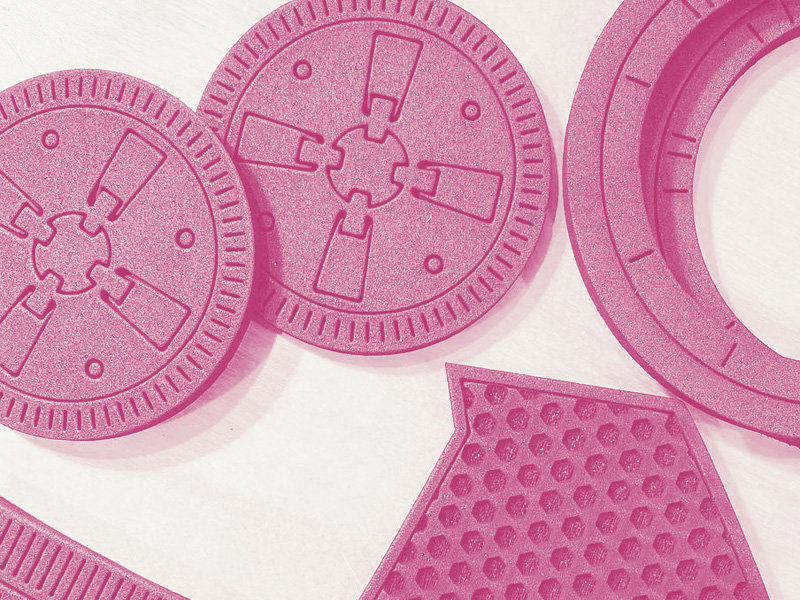
![Laser Engrave Cut Pink Insulation Foam]()

Foamed plastics are classified into soft, semi-rigid and rigid foams based on their flexibility. Rigid foam plastics are used as sound insulation materials and thermal insulation materials for pipes and containers, shock-absorbing packaging materials and floating materials. Soft foam plastics are used as foam artificial leathers and cushion materials.

### What is Insulation Foam?

Insulation foam is a type of rigid foam plastic. The polymer that constitutes the insulating foam is in a crystalline or amorphous state, and its glass transition temperature is higher than normal temperature. Therefore, the insulation foam has a harder texture at normal temperature. So, how to cut it into different shapes with a laser machine, and how to engrave different patterns on its surface.

First of all, we need to understand what is a laser foam engraving and cutting machine and how does it work?

### What is Laser Foam Engraver Cutting Machine?

The laser foam engraving and cutting machine is an automatic device that uses the high heat of the laser beam emitted from the laser tube to transfer to the surface of the foam. It has accurate cutting, fast speed, simple operation, personalized processing and precision, laser head running trajectory simulation display, multiple path optimization functions, and automatic typesetting system to ensure maximum material saving and cost saving, especially suitable for insulation foam engraving and cutting.

### How Does Laser Foam Cutter Engraving Machine Work?

With the movement of the relative position of the laser beam and the foam, the foam is finally engraved with a pattern or a slit is formed, so as to achieve the purpose of carving and cutting foam.

It is mainly used to cut various polymer materials such as engineering plastics, foam plastics, general plastics. The power of this type of machine is generally not too high, and the calorific value is not high, so the cutting width is not very large. 

### How a Laser Machine Cuts and Engraves Pink Insulation Foam?

The [laser machine](https://www.stylecnc.com/products/laser-cutting-machine.html "laser machine") is a highly flexible tool that enables everything from prototyping construction to mass production. You can start right from the design program, which is especially critical for rapid prototyping. Compared to complex water jet cutting processes, laser equipment is significantly faster, more flexible and more efficient. Insulation foam cutting with a laser creates clean fused, sealed edges.

To leave a notch on the insulation foam, a 60W laser generator is more than enough. Generally speaking, a laser generator of more than 80W is required to cut the insulation foam. The specific wattage depends on the thickness of the insulation foam and your requirements. cutting efficiency. Generally speaking, the higher the power, the thicker the foam can be cut, and the faster the cutting speed.

Before starting the [laser engraving machine](https://www.stylecnc.com/laser-engraving-machine/ "laser engraving machine"), you should check whether the power supply is normal, whether the cooling water tank is full of deionized water, and whether the circulating water pump and the inlet and outlet pipes are normal. Check that the emergency stop button of the laser is not pressed, and there are no debris on the upper and inside of the machine. Check that the lenses are clean. If there is dirt, it must be cleaned before use. Check the mechanical part to confirm that there is no debris on the processing table. Check whether the electromagnetic air pump works normally.

If all is well, let's start engraving and cutting pink insulation foam with a laser machine.

Step 1\. Turn on the main power switch, and turn on the machine control power switch. After the system self-check is completed, each axis of the machine returns to the reference point.

Step 2\. Turn on the power of the control cabinet, turn on the circulating water pump, and confirm that there is water flowing out of the water outlet.

Start the chiller and check the water temperature and pressure (normal water pressure is 5bar). Three minutes after the chiller is powered on, the compressor starts, the fan rotates, and cooling begins.

Step 3\. Start the air compressor and air dryer. After the chiller drops to the set temperature (set to 21 degrees), turn on the main power of the laser generator.

Step 4\. Insert the laser power key into the key hole of the switch, turn the key clockwise to turn on the laser power, and wait for the system to be normal (about 30 seconds).

Step 5\. Export directly from the computer to the laser software through the data cable, or you can choose to export to a USB flash memory, and then download to the laser machine.

Step 6\. When the word "READY" appears on the laser panel, apply high voltage.

Step 7\. Confirm the material type, material thickness and material size before cutting. Lay out the insulation foam to be engraved and cut on a work surface.

Step 8\. Use a standard ruler to adjust the height of the laser head, and adjust the plate so that the edge is parallel to the X-axis and Y-axis of the machine tool to prevent the laser head from working outside the range of the plate.

Step 9\. Move the Z-axis to the starting point of the work, simulate the program to be executed, ensure that there is no soft limit alarm, enter the editing mode, and adjust the power, speed, punching time type and thickness according to the material.

Step 10\. After the above items are normal, you can switch to the execution state, and you can start to engrave and cut insulation foam.

When the work is done, shut down in the following order:

1\. After the processing is completed, the prompt bell rings, open the cabin cover, and take out the processed items.

2\. Turn the key counterclockwise to turn off the laser, and turn off the circulating water pump after 1 minute.

3\. Clean up processing residues in the machine.

4\. Power off the control cabinet.

5\. Turn off the air dryer and air compressor.

### Things To Consider

1\. Strictly follow the operation sequence to open and close.

2\. Unqualified personnel are prohibited from operating and repairing the machine.

3\. During the working process, it is strictly forbidden to enter the workbench to ensure the safety of human and machine. When the operator encounters a dangerous situation, the operator must concentrate and press the "emergency stop" button as soon as possible.

4\. The adjustment of the optical path and the laser head in the follow-up mode must be carried out in the correct operation sequence to ensure the safety of the human and machine.

6\. Every time you start the machine, you must return to the reference point, check and clean the focusing mirror, calibrate the coaxiality of the beam nozzle, turn on the auxiliary gas for cutting, and the pressure in the bottle should not be too large (Less than 1Mpa).

In a word, compared with traditional engraving and cutting methods, laser engraving and cutting pink insulation foam is fast, efficient, high precision, and the surface will not be deformed. Whether it is a hobbyist or an industrial mass production, this is a good choice.

### Share This Article With Others

### Further Reading

#### 6 Most Common Types of Laser Generators

2022-04-12[Prev Post](https://www.stylecnc.com/user-manual/laser-generators.html "6 Most Common Types of Laser Generators")

### How to Use a CNC Plasma Cutter for Beginners?

2022-09-07[Next Post](https://www.stylecnc.com/user-manual/how-to-use-cnc-plasma-cutter.html "How to Use a CNC Plasma Cutter for Beginners?")

### Related Guidance

[](https://www.stylecnc.com/user-manual/fiber-laser-cutting-machine-performance-affect-factors.html "What Affects the Performance of Fiber Laser Cutter Machine?")

2021-08-312 Min Read

#### [What Affects the Performance of Fiber Laser Cutter Machine?](https://www.stylecnc.com/user-manual/fiber-laser-cutting-machine-performance-affect-factors.html "What Affects the Performance of Fiber Laser Cutter Machine?")

The factors that affect fiber laser cutting machine performance include laser generator, light path, air cock, auxiliary gas, cutting parameters and materials.

[](https://www.stylecnc.com/blog/how-to-make-money-with-portable-fiber-laser-engraver.html "How to Make Money with Profitable Fiber Laser Engraver?")

2023-08-255 Min Read

#### [How to Make Money with Profitable Fiber Laser Engraver?](https://www.stylecnc.com/blog/how-to-make-money-with-portable-fiber-laser-engraver.html "How to Make Money with Profitable Fiber Laser Engraver?")

Looking for a profitable laser marking machine to start a personalization business? Review the guide on how to use a beneficial fiber laser engraver to make money.

[](https://www.stylecnc.com/blog/laser-cutting-system-types.html "Most Popular Laser Cutting Systems You Can Pick In 2026")

2026-03-074 Min Read

#### [Most Popular Laser Cutting Systems You Can Pick In 2026](https://www.stylecnc.com/blog/laser-cutting-system-types.html "Most Popular Laser Cutting Systems You Can Pick In 2026")

You will meet a variety of laser cutters on the market, how to identify & choose? You can find out from the most popular types of laser cutting systems of 2026.

[](https://www.stylecnc.com/blog/how-to-make-laser-engraver-kit.html "How to Make a Mini Laser Engraver Kit from DVD-ROM?")

2023-08-316 Min Read

#### [How to Make a Mini Laser Engraver Kit from DVD-ROM?](https://www.stylecnc.com/blog/how-to-make-laser-engraver-kit.html "How to Make a Mini Laser Engraver Kit from DVD-ROM?")

Are you building your own mini laser cutter engraving machine? Review this DIY guide on how making a small laser engraver kit from DVD-ROM with parts assemble, software installation & debugging, and machining operations.

[](https://www.stylecnc.com/cnc-software/laser-engraver-cutter-software.html "15 Best Laser Engraver Cutter Software (Paid/Free) in 2026")

2026-04-142 Min Read

#### [15 Best Laser Engraver Cutter Software (Paid/Free) in 2026](https://www.stylecnc.com/cnc-software/laser-engraver-cutter-software.html "15 Best Laser Engraver Cutter Software (Paid/Free) in 2026")

2026 best laser engraver cutter software with paid & free versions include LaserCut, CypCut, CypOne, RDWorks, EZCAD, Laser GRBL, Inkscape, EzGraver, SolveSpace, LaserWeb, LightBurn, Adobe Illustrator, Corel Draw, AutoCAD, Archicad and some popular CAD/CAM software for laser cutter engraving machine.

[](https://www.stylecnc.com/blog/top-20-laser-cutting-products-to-sell-on-amazon-shopify.html "Top 20 Laser Cutting Products to Sell on Amazon & Shopify")

2026-04-077 Min Read

#### [Top 20 Laser Cutting Products to Sell on Amazon & Shopify](https://www.stylecnc.com/blog/top-20-laser-cutting-products-to-sell-on-amazon-shopify.html "Top 20 Laser Cutting Products to Sell on Amazon & Shopify")

Discover 20 high-demand laser cutting products with profit margins of 60-85%. Includes material costs, pricing data, and selling strategies for Amazon and Shopify sellers. 

### Post A Review

1 to 5-star rating5 stars4 stars3 stars2 stars1 star

#### Share Your Thoughts And Feelings With Others

Review Title

Your Name

Your Email

Your Review

Guest Post

Captcha

![Click To Change Captcha]()

Submit Your Review

### Hotspot Guides

![How to Generate G-Code File with ArtCAM for CNC Machine?]()

#### [How to Generate G-Code File with ArtCAM for CNC Machine?](https://www.stylecnc.com/user-manual/how-to-generate-g-code-file-artcam-cnc-machine.html "How to Generate G-Code File with ArtCAM for CNC Machine?")

2026-03-27

![3 Axis vs 4 Axis vs 5 Axis CNC Router Machine]()

#### [3 Axis vs 4 Axis vs 5 Axis CNC Router Machine](https://www.stylecnc.com/user-manual/3-4-5-axis-cnc-router.html "3 Axis vs 4 Axis vs 5 Axis CNC Router Machine")

2024-01-02

![How to Install and Use NcStudio for CNC Router Machine?]()

#### [How to Install and Use NcStudio for CNC Router Machine?](https://www.stylecnc.com/user-manual/Weihong-Ncstudio-engraver-user-s-operation-manual.html "How to Install and Use NcStudio for CNC Router Machine?")

2024-01-17

![How to Use a CNC Router Machine for Beginners?]()

#### [How to Use a CNC Router Machine for Beginners?](https://www.stylecnc.com/user-manual/cnc-router-machine-user-guide.html "How to Use a CNC Router Machine for Beginners?")

2024-06-26

![Round Guide Rails VS Square Guide Rails for CNC Routers]()

#### [Round Guide Rails VS Square Guide Rails for CNC Routers](https://www.stylecnc.com/user-manual/round-square-guide-rails-cnc-routers.html "Round Guide Rails VS Square Guide Rails for CNC Routers")

2024-05-27

![How To Laser Engrave Metal with A Diode Laser?]()

#### [How To Laser Engrave Metal with A Diode Laser?](https://www.stylecnc.com/user-manual/how-to-engrave-metal-with-diode-laser.html "How To Laser Engrave Metal with A Diode Laser?")

2026-03-27

### CNC Machine Catalog

* [CNC Routers](https://www.stylecnc.com/cnc-router/ "CNC Router")
* [CNC Plasma Cutters](https://www.stylecnc.com/plasma-cutter/ "CNC Plasma Cutter")
* [CNC Milling Machines](https://www.stylecnc.com/cnc-milling-machine/ "CNC Milling Machine")
* [CNC Machining Centers](https://www.stylecnc.com/cnc-working-center/ "CNC Machining Center")
* [Edge Banding Machines](https://www.stylecnc.com/edge-banding-machine/ "Edge Banding Machine")
* [CNC Bending Machines](https://www.stylecnc.com/cnc-bending-machine/ "CNC Bending Machine")
* [Laser Cutting Machines](https://www.stylecnc.com/products/laser-cutting-machine.html "Laser Cutting Machine")
* [Laser Marking Machines](https://www.stylecnc.com/laser-marking-machine/ "Laser Marking Machine")
* [Laser Welding Machines](https://www.stylecnc.com/laser-welding-machine/ "Laser Welding Machine")
* [Laser Cleaning Machines](https://www.stylecnc.com/laser-cleaning-machine/ "Laser Cleaning Machine")
* [Laser Engraving Machines](https://www.stylecnc.com/laser-engraving-machine/ "Laser Engraving Machine")
* [CNC Digital Knife Cutters](https://www.stylecnc.com/cnc-knife-cutting-machine/ "CNC Digital Knife Cutting Machine")
* [CNC Wood Lathe Machines](https://www.stylecnc.com/wood-lathe/ "CNC Wood Turning Lathe Machine")
* [CNC Parts, Tools, Accessories](https://www.stylecnc.com/spare-parts/ "CNC Spare Parts, Tools, Accessories")

### Get Easy Solution

Your MachineYour MachineCNC MillCNC LatheCNC RouterLaser CutterLaser WelderLaser CleanerLaser EngraverEdge BanderPanel BenderDigital CutterPlasma CutterWaterjet CutterCNC Machining CenterMultiple ToolsNot Listed Above

Your MaterialYour MaterialMetalWoodFoamGlassPaperStoneFabricPlasticAcrylicCrystalRubberLeatherCompositesMultiple Materials

Your BudgetYour BudgetNo BudgetUnder $3,000$3,000 - $6,000$6,000 - $8,000$8,000 - $10,000$10,000 - $12,000$12,000 - $15,000$15,000 - $20,000$20,000 - $30,000$30,000 - $50,000$50,000 - $80,000$80,000 - $100,000Over $100,000

Your Email

Your Requirements

Submission Successful, Redirecting In 5 Seconds...

### STYLECNC